Jun
25

Review: Design Commission’s iPhone Stencil Kit

iphone_stencil

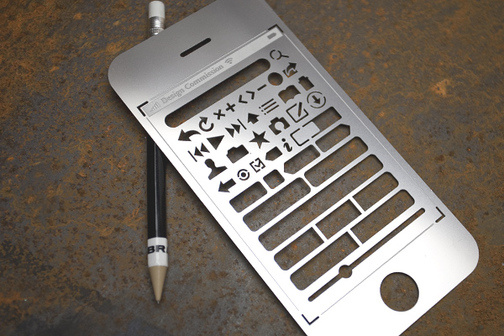
The guys over at the Design Commission [@designcom on Twitter] have gone and made an iPhone Stencil Kit as a follow up to their popular Website Stencil Kit. Initially they had 1,000 stencils made for sale, but due to popular demand, have since made many many more. I received mine on Monday and have started using it for an iPhone App that I am currently developing.

The details:

The kit costs $16.95 + shipping&handling [Domestic shipping is $4.95 and international is $15] and includes:

  • One iPhone UI Stencil
  • Zebra mechanical pencil
  • 2 Design Commission stickers
  • Downloadable .PDF letter-sized paper template

Using the kit

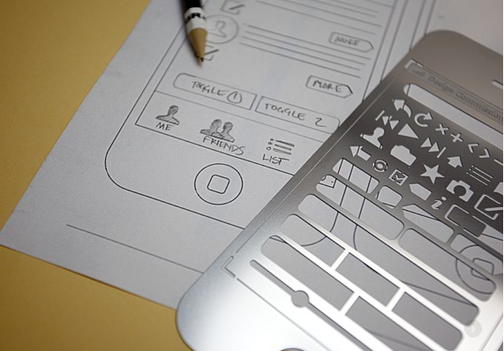
The kit is really created with the intended use of the printable PDF templates. It doesn’t have a full iPhone body stencil to draw your iPhone on a separate paper. It does do a decent job at half-skeleton of one though. You’ll have to fill in some missing lines yourself. The notable missing seems to be status bar, the section with the wifi, 3G, and battery icon area, not being stenciled. The other small problem I ran into so far is that it’s made of stainless steel. I can’t see what’s under the stencil as I try to approximate the needed spacing between Tab Bar icons. Although, I do need to keep in mind that it’s made of stainless steel to be more durable than plastic and also that I’m making prototype designs to show clients, not finalized work.

Overall, the only real downside I can see, is that you really do have to use a mechanical pencil. The one provided by Design Commission, is a Zebra, which are extremely good. But, if you use a regular #2 pencil, you will likely run into some trouble on some of the smaller stencil bits, requiring you to constantly sharpen your pencil tip. Other than that, it’s a really great addition to any iPhone developer’s arsenal.

Now of course, this is all for paper prototyping. And if you have been following Stanford’s CS193P iPhone Programming class on iTunes, Steve Marmon discussed the importance of paper prototyping for iPhone App design in his lecture How to Build an iPhone App that Doesn’t Suck [iTunes link.]

If you prefer digital prototyping, Balsamiq has updated their software to include iPhone designing, and  in my previous post: 5 Free iPhone Resources, I have links to Omnigraffle, Adobe Fireworks, Photoshop, and Illustrator stencil kits.

Read More →

Jun
9

5 Free Resources for iPhone App Development

Joe Hewitt's Three20 Project

Joe Hewitt's Three20 Project

With Apple’s WWDC currently going on and the upcoming 3.0 iPhone OS getting closer to release, there are tons of new developers jumping onto the platform. Whether you’re a new developer or have been developing for a while, here are some great free resources for designing and developing your iPhone Apps.

  1. Google Objective-C Data APIs

    Google generously provides a large set of their APIs in Objective-C for both Mac and iPhone development. These APIs include:

    Check out my previous post on How to add the Google APIs to your iPhone App project.

  2. Joe Hewitt’s Three20 Project

    Joe Hewitt is the developer behind the popular Facebook iPhone App and the Mozilla Firefox plugin Firebug. He’s created a new projected called Three20, which is a collection of iPhone UI classes, like a photo viewer, and general utilities, like an HTTP disk cache. The project and instructions on getting it into your iPhone App project are hosted up on GitHub.

  3. iPhone Photoshop PSDs

    It’s always a good idea to start with a design before you start developing your iPhone App. It’s also easier to show a potential client a PSD mock-up of the app before doing actual development even though Interface Builder makes it an easy process. Here are a few Photoshop PSDs to get you going.

    Note: If you are planning on using these for making an iPhone Apps website, make sure either you or your client has gone through Apple’s Available on the iPhone App Store logo license program to avoid any legal issues. This can be found in your Apple Developer Connection Program Portal’s Distribution -> App Store tab.

  4. OmniGraffle Stencil Kits

    If you’re on a Mac and use Omni Group’s OmniGraffle for wireframing or mindmapping web design, you can do the same with iPhone apps.Here are 3 iPhone Stencil sets for OmniGraffle. Also, Yahoo!’s set can be found on the Yahoo! Developer site with stencils for many other things and also in makes them available in Photoshop PSD format.

  5. Glyphish – iPhone Toolbar Icons

    The Glyphish designer has generously put out 80 free icons for use in your iPhone App’s toolbar. These are all free and licensed under Creative Commons.

3 Bonus Resources

  1. Mercury Intermedia’s iPhone UI Vector Elements for Adobe Illustrator.

    Working in Illustrator instead of Photoshop? These free vector elements great for designing.

  2. eddit’s 120 iPhone Toolbar Icons

    While this one isn’t free, it is a really good and worthwhile one. Eddie Wilson over at eddit has created 120 iPhone Toolbar Icons for sale at $69. If you want the vector format, it’ll cost you a pretty $189 for the PSDs.

  3. Open Source iPhone Apps

Have I missed any others? Do you have any more free resources? Please feel free to share them in the comments!

Edit 6/23/09:

An additional Adobe Fireworks set of UI elements has been found thanks to Building43.

Fireworks toolkit for creating iPhone UI mockups by MetaSpark

Also check out Building43′s video on designing iPhone Apps with Adobe Fireworks.

Read More →

Jun
8

How To Use Google APIs with iPhone SDK

Adding Google API support to your iPhone App could not be any easier. Google provides Objective-C APIs for:

Read More »

Read More →

Jun
5

Google Releases Page Speed

Google just released Page Speed, their competitor to Yahoo! YSlow. Both plug-ins for Firebug. Obvious requirements include Mozilla Firefox and Firebug plug-in.

So far it’s been pretty to look at. There’s 2 tabs instead of YSlow’s 1 tab. You can also Record Activity and measure page loading speed as well.

firebug

The one thing I do not like right now is that Page Speed creates 2 folders in my home directory on the Mac OSX. I’m not sure where the folders go in Windows systems yet. These folders just hold some cached items when you run the Page Speed to analyze performance.

page_speed_folders

Google’s Page Speed results are a bit different than Yahoo! YSlow. YSlow gives you “grades” and Page Speed just gives you green, red, or yellow signs. It also gives you an explanation of what you can do to make your pages load faster. Page Speed also does not give you the little icon next to Firebug that tells you how long it took to load the initial page. Something I actually like to know even if I’m not performance tuning my own website.

So far, Page Speed is a welcomed addition to the Firebug arsenal. Also check out SitePoint’s CodeBurner Firebug plug-in. It’s a great little reference for HTML and CSS. And Robert Nyman’s FireFinder for Firebug is handy search for Firebug.

What are your thoughts on Google Page Speed? Are you using both Yahoo! YSlow and Google Page Speed?

Introducing Page Speed – Google Code Blog

Read More →

Jun
4

The Legal Minefield

Disclaimer: I am not a lawyer, law student or anything remotely close and/or in any way related to the law field.

That said, I do still have my own legal issues to be aware of. Recently, I have started up my own company, which brings even more legal nightmares. As for my design and development work, there are quite a bit of legal things that I needed to be aware of.

Copyright

These are pretty easy to register. At least in the U.S. it is. I’m not so sure about how other countries work. For the U.S. head on over to the U.S. Copyright Office’s website and do the online registration. It costs about $35 per copyright. This is good for just about all design work and also includes the programming code.

Licenses

These are the ones that have most recently driven me crazy. You can license your code, design work, photos, etc with various different licenses such as Creative Commons, MIT, GNU and many more.  There are a lot of resources available online for these and Creative Commons helps you pick the license you want to use.  My confusion comes from having both a Copyright and License on the same material. As a general understanding, everything I write and put on my website is Copyrighted. But at the same time, I have some code that is freely available for downloading and modification under MIT license both on my website and also on GitHub.

Another issue I am working on figuring out all the legalities of, is how to properly license out work to a client. I have seen quite a few articles online and even some books stating that it’s best to retain the Copyright for the websites I design and build, while licensing out the design to the client. That’s a great idea, but there’s no legal paperwork or explanation on how this whole process works. AIGA has a pretty good write-up for designers.

I’m still trying to figure this all out, but I have run into some good resources.

Additional Resources

Read More →

Page 4 of 11« First...2345610...Last »